
—-> Click here for the Github <—-
Why build it?
I travel a lot, and when I plan my travel, Google Calendar is my lord and savior.
I’m the type of guy who usually needs to plan my trips down to the last minute to feel like I’m squeezing out all of the juice from my time, so I usually spend quite a lot of time going back-and-forth between GCal, Google Maps, ChatGPT, and a bunch of other websites to get the perfect trip.
This means making several GCal events (ranging from just 5 minutes to hours long) that often get added, moved, and deleted as my trip comes into being.
At the end, this makes a somewhat beautifully colorful, but intensely chaotic, set of events that depend highly on one another, on the date and time, and on many other factors.
For some reference of what I mean, see a picture of my trip to Costa Rica around New Years of 2026:

The annoying part is, though, GCal doesn’t really have a lot of intelligence to make connections between different events, selecting multiple events as a group, etc., and so it can be excessively annoying to do some relatively simple things, such as:
- Moving an entire set of events from one day to another day
- Right now, you have to select each event individually and move it to the other day
- Imagine if you were shifting your entire trip back by a day: You’d have to select EVERY SINGLE EVENT and move it back
- Bulk delete
- There’s no way you can even select multiple events, much less delete them all at once
- Updating the auto-import to have more pertinent information, such as price
- Things like hotel bookings, flights, etc., are sometimes auto-imported into GCal correctly, but when they are, they are often missing a lot of great information, most notably price
Then there are also some less simple, but still incredibly valuable things that could be added, like:
- An “intelligent” calendar that plans trips and replans trips as things come up
- Basically, an LLM-based calendar that allows you to replan events any way you want with a chatbot
- For example, let’s say instead of doing all the flight stuff above in the case that you want to move your flights, you just ask the chatbot to find you the next best flight given all the parameters and it does everything for you!
- Even simpler would just be an LLM that you could ask anything of that could be done, but are somewhat annoying, in GCal now (such as setting up recurring events that are adjusted for timezones).
- Instead, I would just like to say to a chatbot, “Make a recurring event that starts on *this date* and ends on *this date* and lasts for 7 weeks and takes into account time zone shifts and will get sent out to *these people* on *this calendar*” and it does it in seconds.
- Right now, you can do all this (I’ve had to do this exact thing), but it can take some time to get right.
- Even more important is having a chatbot to help you CHANGE it once you realized you made small thing wrong (which can make it very annoying to deal with after).
- A way to automatically see different options for flights based on how you change your events
- One of the MOST helpful things I wish was automatically included in GCal was an integration with Google Flights
- Specifically, imagine the situation where you plan a trip to leave on Wednesday.
- You already set all the events up and found the perfect flight, but now, for some reason, you have to change your entire trip to leave on some day between Friday and Sunday.
- In this scenario, if you still wanted to spend the same amount of time and do all the things you had planned on doing, you now have to find flights that make it possible.
- This might be as simple as going to Google Flights and finding the same exact flight on the new day, which may be true for popular routes, like New York to Miami, but for less popular routes, like New Orleans to Sioux Falls, this may be extremely convoluted.
- More often than not, you will have to replan your entire trip around the flights available, which means having to change all the events around of Google Calendar.
- This is especially annoying because you have to translate a textual format (e.g., seeing a flight written out like 8:47 am-10:43 am) and then translate it to a visual format (i.e., the event blocks on GCal) PLUS you have to take into account the various time zones.
- I wish there were a way you could just see the flights visually and have a simple “< >” interface that walks through each of the options available on the new dates with their prices.
- You could set up the same filters like you could in Google Flights (like dates, prices, nonstop, etc.) and it would just show it visually!
- And if you liked one, you just pressed “Add to calendar,” and it would be added, plus a link to where you can book it.
- You already set all the events up and found the perfect flight, but now, for some reason, you have to change your entire trip to leave on some day between Friday and Sunday.
- Another cool integration would be the ability to select multiple home airports (such as Houston, Austin, AND Dallas) and see the flight options for all of them if you’re willing to drive.
- I wish this were just a thing in Google Flights in general!
Perhaps some or all of these things have already been built (in fact, I’m sure they have to some extent because it’s so annoying!), but I do think there are probably nuanced things dealing specifically with the LLM aspect and with travel that haven’t been built yet.
Since this is a big project with several different, potentially independent parts, I am going to split it up into sections and write about them as I work on them.
Calendar-Aware Flight Planner
Why build it?
- I wish there was a way to automatically see different options for flights based on how you change your events
- One of the MOST helpful things I wish was automatically included in GCal was an integration with Google Flights
- Specifically, imagine the situation where you plan a trip to leave on Wednesday.
- You already set all the events up and found the perfect flight, but now, for some reason, you have to change your entire trip to leave on some day between Friday and Sunday.
- In this scenario, if you still wanted to spend the same amount of time and do all the things you had planned on doing, you now have to find flights that make it possible.
- This might be as simple as going to Google Flights and finding the same exact flight on the new day, which may be true for popular routes, like New York to Miami, but for less popular routes, like New Orleans to Sioux Falls, this may be extremely convoluted.
- More often than not, you will have to replan your entire trip around the flights available, which means having to change all the events around of Google Calendar.
- This is especially annoying because you have to translate a textual format (e.g., seeing a flight written out like 8:47 am-10:43 am) and then translate it to a visual format (i.e., the event blocks on GCal) PLUS you have to take into account the various time zones.
- I wish there were a way you could just see the flights visually and have a simple “< >” interface that walks through each of the options available on the new dates with their prices.
- You could set up the same filters like you could in Google Flights (like dates, prices, nonstop, etc.) and it would just show it visually!
- And if you liked one, you just pressed “Add to calendar,” and it would be added, plus a link to where you can book it.
- You already set all the events up and found the perfect flight, but now, for some reason, you have to change your entire trip to leave on some day between Friday and Sunday.
- Another cool integration would be the ability to select multiple home airports (such as Houston, Austin, AND Dallas) and see the flight options for all of them if you’re willing to drive.
- I wish this were just a thing in Google Flights in general!
- Of course, though, if Google won’t make the integration, then I’ll do it myself!
How does it work?
—-> Click here for the Github <—-
At this point, it basically will find the top whatever (10?) available flights straight from Google Flights through SerpAPI based on the same filters you would use to filter on the web version of Google Flights and display them visually on your Google Calendar.
You can do your departure and arrival flight at the same time!
While this, in and of itself, is awesome and what I wanted from the beginning (translating the text of Google Flights into visual GCal events), I took it one step further: The flights it shows to you are AWARE of the other events in your calendar and won’t be shown if they conflict with other events.
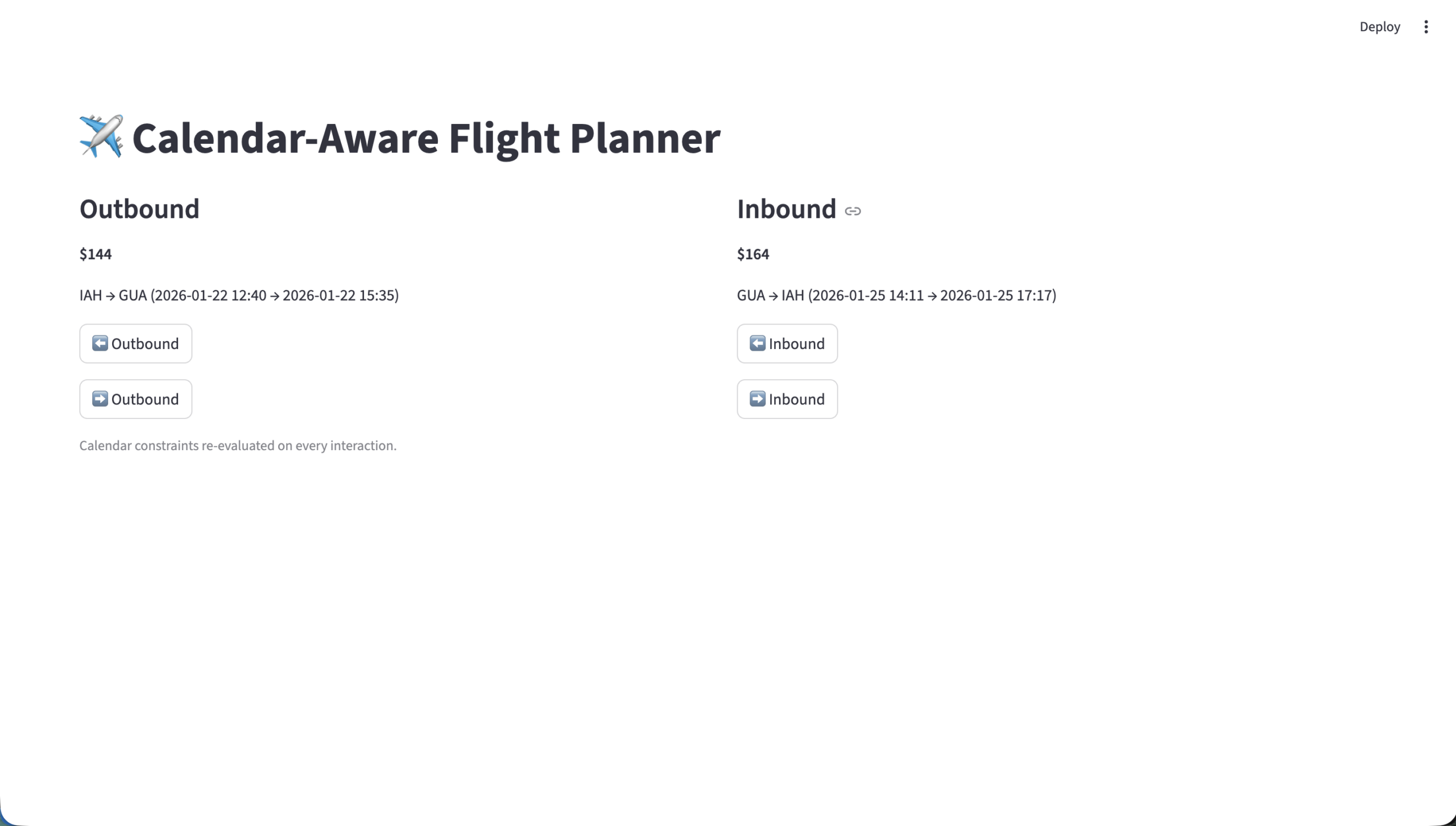
There’s also a simple UI (made with streamlit) that allows you to progress through each of the flight options for outboundand inbound independently:

For example, let’s say you start out with 10 options for outbound flights on Monday, with the first leaving at 6 am and the last arriving at 10 pm. There may be nonstop and connections, but either way, it treats both as one block of time based on when you leave for the first flight and when you arrive from the last flight in the sequence (which, for nonstop, are the same flight). If you don’t have any other events on that Monday, then it will progress through each of the flights as normal and show you all 10 options.
However, if you add an event at 2 pm on that day (for example, “Opera tickets”), it will automatically limit the shown flight options to those where the latest flight arrives BEFORE 2 pm at your destination. You can then scroll through the available options, which may just be 4 possible flights. Then, if you move the event to 12 pm, the software may only show 2 events.
The same would hold true for outbound flights, except now it will limit flight options to those that depart AFTER the latest event that you manually add.
Now, you can make flight planning a very visual and integrated part of the trip planning process, rather than a confusing mess of flight times, Google Chrome tabs, etc.
Timeline
- Got amadeus working -> Dec 11, 2025
- Got flight option retreival through SerpAPI working (serp_api.py) -> Dec 13, 2025
- Cycling through flights based on valid times on other activities (plan_trip.py) -> Dec 13, 2025
- Dynamic flight valid updates based on moving activiites around (including to other days) -> Jan 17, 2025
- Moved UI to simple streamlit dashboard (streamlit run plan_trip.py) -> Jan 17, 2026
- Publish it on Github -> Jan 17, 2026
Lessons Learned
- Though there are APIs that go directly to a GDS (like Amadeus), probably the easiest way to simulate Google Flights is just by scraping it or using SerpAPI (which is just a Google Flights scraper anyway).
- Google Flights is the best consumer flight search engine on the market, why try to use anything else?
- Annoyingly, Google doesn’t give any APIs (probably so you can’t just recreate it), but it’s still the best thing to use as the database, even if you have to get the data through scraping.
- For comparison, the Amadeus API does not show all of the possible flight options, nor does it always show the correct prices. So in that sense, it’s not even usable.
- Dealing with Google Calendar to create events, move them around, and things like that is actually not too difficult.
- There is a decent GCal API that allows you to do all of this programmatically and I would expect that making an LLM on top of this would not only be possible, but perhaps not very difficult at all.
- When testing new scripts, don’t focus on optimizing the UX so much.
- I spent an inordinate amount of time trying to get a simple desktop-based UI to work to make my testing slightly easier, when I ended up just scrapping it in the next round of revisions to move to a browser-based UI.
- While testing anything (unless you’re specifically testing the frontend of course), the focus should be on the backend and getting the logic working as fast as possible.
- Create just enough of a UI to allow for rapid testing and let it go.
- Things like aesthetics DON’T MATTER until you finalize what the general UX feels like.